Pay Stub vs Paycheck: What's the Difference?
Prepared by Paystub Pilot
Payroll and tax research
Reviewed against DOL wage statement guidance.
Pay stubs and paychecks are related but distinct documents. Learn what each one is, why the difference matters, and when you need one versus the other.
What Is a Paycheck?
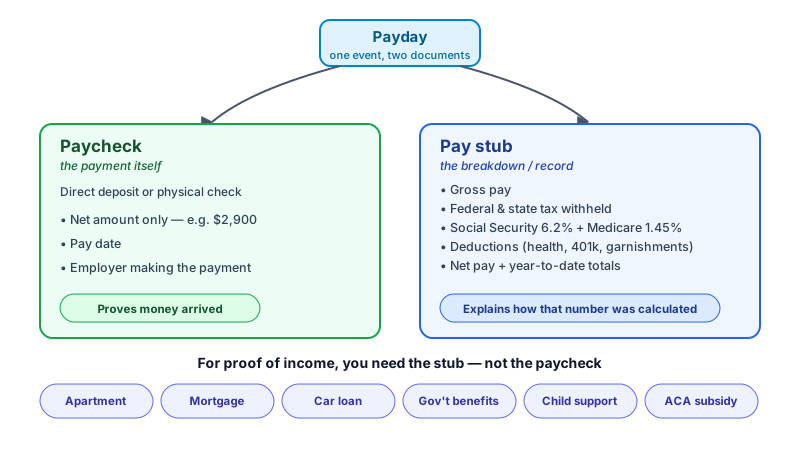
A paycheck is the payment itself: the physical check or ACH transfer that lands in your account on payday. Historically that meant a printed check you walked to the bank. Today most employer payments run through direct deposit, governed at the rails level by NACHA's ACH operating rules.
The paycheck carries minimal information by itself: amount paid, pay date, and the employer making the payment. The transaction record only shows net pay, the amount left after taxes and deductions came out somewhere upstream.
What Is a Pay Stub?
A pay stub (also called a paycheck stub, earnings statement, or wage statement) is the breakdown document that accompanies the payment: where the paycheck shows net pay, the stub shows how that number was reached.
A typical stub contains:
- Gross pay, total earnings before any deductions
- Federal income tax withheld, scaled by W-4 entries against IRS Pub 15-T tables
- State income tax withheld (where applicable)
- Social Security tax at 6.2% of gross up to the 2026 wage base of $184,500
- Medicare tax at 1.45% of gross, plus 0.9% Additional Medicare Tax on earnings above $200,000 single or $250,000 MFJ
- Deductions: health insurance, 401(k) and other retirement contributions, life insurance, union dues, garnishments
- Net pay, the amount deposited or paid
- Year-to-date totals for each line
The legal weight comes from two places. The Fair Labor Standards Act requires employers to keep detailed payroll records under DOL Fact Sheet 21 (29 CFR Part 516). On top of that, most states have their own wage-statement laws that mandate the format and contents of the document employees actually receive. California Labor Code §226 is the canonical example: it spells out exactly which fields must appear on an itemized wage statement, and California courts have awarded penalties for omissions. New York's §195.3 and Oregon's ORS 652.610 work similarly.
Pay Stub vs Paycheck: Where the Difference Shows Up
Income verification. Landlords, mortgage underwriters, auto lenders, and benefit agencies require pay stubs, not paychecks. A direct-deposit transaction shows that money arrived; a pay stub shows gross, year-to-date totals, and source, the information underwriters use to qualify a borrower.
Tax preparation. When the W-2 arrives, compare its Box 1 with the final pay stub's YTD federal taxable wages. Do not assume every pre-tax deduction reduces Box 1 in the same way. A mismatch may reflect taxable fringe benefits, year-end adjustments, or a payroll error, so ask payroll to reconcile it before filing.
Budgeting. Net pay is what's actually spendable. The pay stub shows the breakdown that explains why a $4,000 biweekly gross becomes a $2,900 deposit. Without the line-by-line view, it's hard to know whether bumping a 401(k) contribution by $200 will really cost you $200 of take-home (it won't, because pre-tax contributions reduce withholding too).
Employment disputes. A pay stub records hours, pay rate, overtime calculation, and every deduction taken. In a wage-and-hour claim, the stubs are the documentary backbone; a bank record of the net deposit isn't.
Do You Always Get Both?
Not always. Direct deposit replaced most physical checks years ago. The money lands in your account on payday and the stub usually sits in an employer portal or payroll vendor's app. The federal Electronic Fund Transfer Act (15 U.S.C. §1693) governs the consent and disclosure rules for direct deposit itself, not the format of the pay stub.
Pay-stub format is mostly state law. Federal law (under the FLSA and DOL recordkeeping rules) requires employers to keep payroll records but doesn't require them to hand a copy to the employee. Most states fill that gap with their own wage-statement statutes, and the rules differ. California, New York, Texas, and most other large-population states require itemized stubs delivered every pay period. A small group of states have no pay-stub requirement at all. The format (paper, electronic, opt-in to electronic, etc.) also varies by state.
Self-employed workers, freelancers, and independent contractors don't receive either document from a client because there's no employer-employee relationship. A self-employment income statement (the document Paystub Pilot produces in those cases) is a summary of self-paid income, not an employer-issued stub, which is the distinction landlords and lenders care about most.
When You Need a Pay Stub Specifically
Income verification (apartments, mortgages, car loans, government benefits) is covered above. Two additional situations where the stub is specifically required:
- Child support/alimony: Courts calculate payment obligations from gross earnings shown on the stub, not from the net deposit.
- Health insurance enrollment: ACA Marketplace plans verify household income for subsidy eligibility using YTD totals.
Creating a Pay Stub When You Don't Have One
If you're self-employed, a freelancer, a gig worker, or a contractor and your business doesn't issue stubs, you can create a pay-stub-style income summary from your real records. Paystub Pilot lets you enter the pay period, gross income, filing details, and deductions, then preview the tax breakdown before you download the PDF.
The structured format gives income reviewers a familiar document while your bank statements, tax returns, and invoices serve as the underlying proof.
Create your pay-stub preview and compare the numbers against your source records before downloading.