Pay Stub Example & Template: What Each Field Means
Prepared by Paystub Pilot
Payroll and tax research
Reviewed against DOL recordkeeping guidance, IRS FICA guidance, and California itemized wage-statement examples.
A field-by-field pay stub example showing gross pay, taxes, deductions, net pay, YTD totals, employer details, and the lines reviewers actually check.
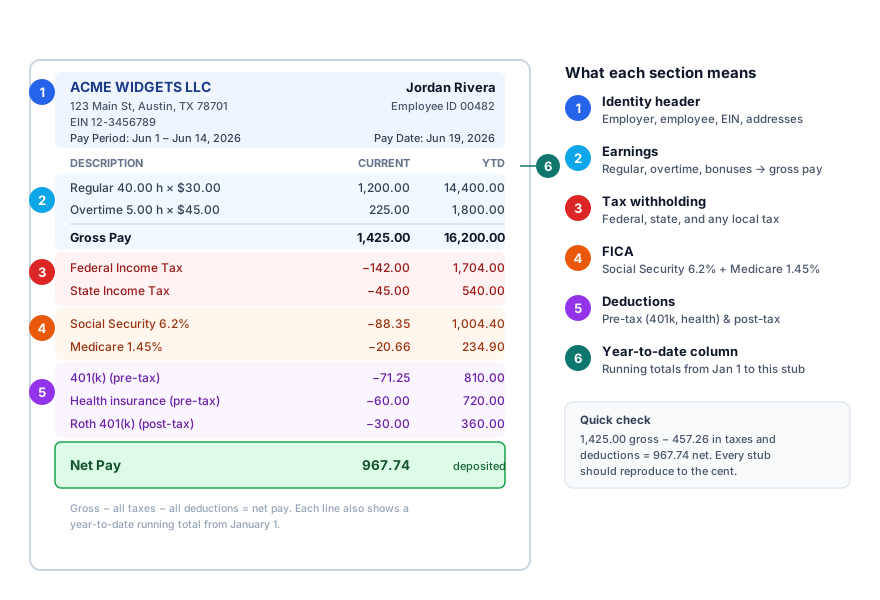 Annotated sample pay stub with labeled regions. Identity header, earnings and gross pay, federal and state tax, FICA (Social Security 6.2% and Medicare 1.45%), pre-tax and post-tax deductions, and the year-to-date column
A Simple Pay Stub Example
Here is a plain pay stub example for a biweekly W-2 employee:
| Field | Example |
|---|---|
| Employer | Northside Fabrication LLC |
| Employee | Jordan Lee |
| Pay period | Jun 1, 2026 to Jun 14, 2026 |
| Pay date | Jun 19, 2026 |
| Pay frequency | Biweekly |
| Regular hours | 80.00 |
| Regular rate | $25.00 |
| Gross pay | $2,000.00 |
| Federal income tax | $178.42 |
| Social Security | $124.00 |
| Medicare | $29.00 |
| State income tax | $64.10 |
| Health insurance | $85.00 |
| 401(k) | $100.00 |
| Net pay | $1,419.48 |
The exact tax lines depend on the employee's W-4, work state, pre-tax deductions, year-to-date wages, and pay frequency. The purpose of the example is to show the structure.
Employer and Employee Information
A pay stub should clearly identify who paid whom. Employer name and address matter because lenders, landlords, and agencies use them to verify employment. Employee name matters because the stub has to match the application, W-2, bank account, and tax file.
Avoid full Social Security numbers. Use the last four digits or an employee ID where allowed. California's wage-statement guidance, for example, uses the last four digits or an employee identification number rather than a full SSN.
Pay Period vs Pay Date
Watch this at year-end: a check dated January 2 for work performed in late December belongs to the new tax year for W-2 purposes, because the pay date controls, not the pay period. That is why pay period vs pay date is one of the first things to check when a final stub does not match a W-2.
Earnings Section
The earnings section explains gross pay. Common lines include:
- Regular wages
- Overtime wages
- Salary
- Bonus
- Commission
- Tips
- Holiday pay
- PTO
- Shift differential
Hourly non-exempt workers should see hours and rates. A stub that only says "gross pay: $2,000" may be readable for a salaried exempt worker, but it is usually too thin for an hourly employee in a state with detailed wage-statement rules.
Tax Lines
Start with FICA because the math is fixed. On $2,000 of wages below the Social Security wage base, employee Social Security should be exactly $124.00 (6.2%) and Medicare should be exactly $29.00 (1.45%). If those numbers are off, the stub has a problem worth investigating before anything else.
Federal income tax is less predictable: it depends on the W-4 elections and IRS withholding tables, so variation across employees is normal. What is not normal is a zero or a round number with no explanation.
Deductions Section
Deductions explain why net pay is lower than gross pay. What matters is whether the deduction is pre-tax or post-tax, not only the amount.
Pre-tax deductions can reduce federal taxable wages. Common examples include traditional 401(k), health insurance under a cafeteria plan, HSA, and FSA contributions. Post-tax deductions come out after taxable wages are calculated. Roth 401(k), some insurance, and wage garnishments often fall here.
For a deeper list, see pay stub deductions explained.
Net Pay
The math should close: gross pay minus taxes minus deductions equals net pay. If the stub says $2,000 gross and $1,419.48 net, the taxes and deductions listed should add to $580.52. A discrepancy there is not a rounding quirk; it is a payroll error.
Year-to-Date Totals
YTD totals show cumulative earnings, taxes, deductions, and net pay since January 1. Lenders, tax preparers, and auditors rely on them because a single stub can look fine while a pattern of errors hides in the YTD column.
The cross-check: each period's YTD should increase by exactly that period's gross, and each tax line should follow the same logic. If the YTD column stops growing consistently, either wages hit a cap (such as the Social Security wage base) or something was corrected upstream and the explanation should be visible on that prior stub.
What Makes a Good Template
A good template makes the numbers easy to audit. It includes:
- Clear section labels
- Pay-period dates and pay date
- Hours and rates where needed
- Separate earning lines
- Separate tax lines
- Separate deduction lines
- Net pay
- YTD columns
- Employer and employee details
Design matters less than clarity. A stub that looks polished but hides overtime hours or combines all deductions into one unexplained line is worse than a plain stub that shows every calculation.
Create a pay stub and preview the PDF before downloading the clean copy.