Canadian Pay Stub vs T4: How They Connect at Year-End
Prepared by Paystub Pilot
Canadian payroll research
Reviewed against the CRA T4 employer guide and T4127 payroll formulas.
Pay stubs and T4s serve different purposes but work together. Learn how a pay stub captures period earnings while a T4 summarizes the full year, what boxes on the T4 correspond to your final pay stub, and what to do when they don't match.
Pay Stub vs T4: Two Documents, One Year
A pay stub records a single pay period: gross earnings, deductions, and net pay. A T4 (Statement of Remuneration Paid) summarizes the full calendar year of employment income, source deductions, and pensionable/insurable earnings for one employer. Employers must issue T4 slips to employees and file them with the CRA by the last day of February following the tax year. If you worked for more than one employer, you get a T4 from each.
The year-to-date totals on your final pay stub of the year should reconcile with the corresponding boxes on your T4, within rounding. When they don't, the T4 is the official record: the CRA receives a copy from your employer and matches it against what you report on your T1 General. Reading a pay stub line by line makes year-end reconciliation straightforward.
What Appears on a Canadian T4
The T4 has roughly 30 numbered boxes plus an "Other information" section with codes 30 through 87 for less common items (taxable benefits, allowances, special-situation amounts). Most employees only need to look at a handful.
For a standard employee with no commissions or special benefits, these are the boxes that matter:
- Box 14, Employment income. Total gross employment income paid in the year. This is what feeds line 10100 of your T1.
- Box 16, Employee's CPP contributions. Base CPP withheld (Box 16A reports CPP2 contributions separately).
- Box 17, Employee's QPP contributions. Used for Quebec employees instead of (or alongside) Box 16.
- Box 18, Employee's EI premiums. EI withheld for the year.
- Box 20, RPP contributions. Registered Pension Plan contributions deducted by the employer.
- Box 22, Income tax deducted. Combined federal and provincial/territorial income tax withheld. The T4 doesn't separate the two; the breakdown lives on your pay stubs.
- Box 24, EI insurable earnings. The earnings on which Box 18 was calculated (capped at the MIE, $68,900 for 2026).
- Box 26, CPP/QPP pensionable earnings. The earnings on which Box 16 / Box 17 was calculated (capped at YMPE, $74,600 for 2026).
- Box 10, Province of employment. Two-letter code (ON, BC, QC, etc.).
- Box 40, Other taxable benefits. Group life insurance, parking, employer-paid premiums, and similar non-cash benefits already included in Box 14.
- Box 42, Employment commissions. Commission income already included in Box 14, broken out for self-employed CPP and other purposes.
- Box 44, Union dues. Deductible union dues already withheld through payroll.
- Box 52, Pension adjustment (PA). Reduces next year's RRSP contribution room for members of an RPP or DPSP.
For an employee with no commissions, union dues, or RPP, the boxes that actually matter at filing time are 14, 16, 18, 22, 24, and 26. The CRA's RC4120 Employers' Guide is the canonical reference.
How Your Final Pay Stub Maps to Your T4
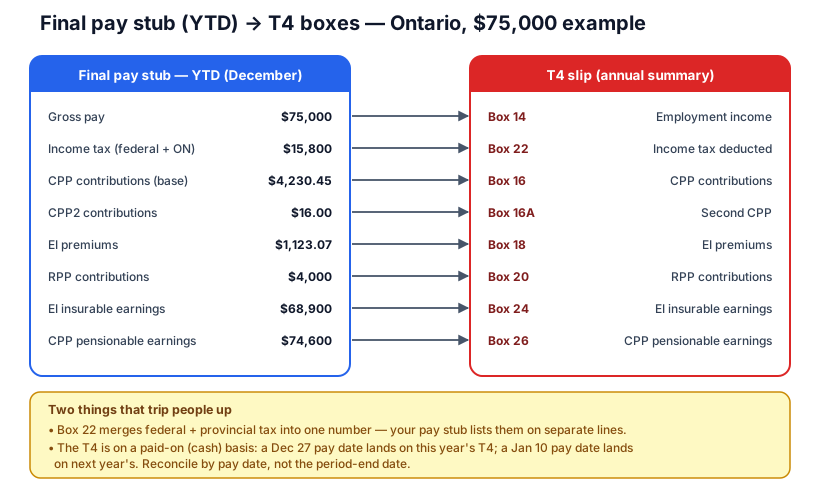
For a typical Ontario employee, the final pay stub of the year should line up like this:
- YTD gross pay → Box 14
- YTD CPP contributions → Box 16
- YTD EI premiums → Box 18
- YTD income tax (federal + provincial combined) → Box 22
- YTD insurable EI earnings → Box 24
- YTD pensionable CPP earnings → Box 26
Worked example. An Ontario employee earning $75,000 with $4,000 in RPP contributions (deducted by the employer through payroll) and standard TD1 claims would see, on the final December pay stub:
- YTD gross: $75,000 (Box 14)
- YTD income tax: combined federal + Ontario withholding, in the $11,000–$12,000 range depending on TD1 claims (Box 22)
- YTD CPP (base): $4,230.45, 5.95% of ($74,600 − $3,500) (Box 16)
- YTD CPP2: $16, 4.00% of ($75,000 − $74,600) (Box 16A)
- YTD EI: $1,123.07, 1.63% of $68,900 capped MIE (Box 18)
- YTD EI insurable earnings: $68,900 (Box 24)
- YTD CPP pensionable earnings: $74,600 (Box 26)
- YTD RPP contributions: $4,000 (Box 20)
- YTD net pay: roughly $54,000–$55,000
These should match T4 boxes within rounding (the CRA T4127 formulas drive both the period-by-period payroll calculation and the year-end T4 amounts).
When Your Final Stub Doesn't Match Your T4
A few common reasons the numbers can diverge:
Mid-year province change. You moved from Ontario to BC and your employer updated the withholding code on the effective date. Your pay stubs show Ontario tax until the move, BC tax after. Box 22 on the T4 shows the combined total of both. The stub split is normal; the T4 consolidation is normal too.
Late taxable benefits. An employer adds a subsidized parking, dental, or group life benefit and the taxable value is processed after the final pay run. That value goes into Box 40 (and is also included in Box 14), but it may not appear on your last stub of the year. Result: Box 14 exceeds your final stub's YTD gross. Ask payroll for the benefit calculation if you want to confirm.
RPP true-ups. Year-end RPP corrections can shift Box 20 slightly from your final stub's YTD RPP figure. The T4 reflects the final calculation.
Payroll corrections. When an employer catches an error after the last pay run, they issue an amended T4 (marked "AMENDED" at the top). File using the amended slip.
Pay-period timing. T4 reporting is on a paid-on (cash) basis, not earned-on. Earnings with a pay date of December 27, 2026 appear on your 2026 T4 even if the underlying work was done in November. Earnings with a pay date of January 10, 2027 appear on your 2027 T4 even if the work was done in late December 2026. Use the pay date when reconciling, not the period-end date. This is set out in RC4120 (the Employers' Guide to the T4).
T4 Deadlines and When You Should Receive It
Employers must issue T4 slips to employees and file with the CRA by the last day of February following the tax year, so 2026 employment income generates a T4 due by February 28, 2027 (or February 29 in a leap year). If you don't have your slip by early March, ask payroll. You can estimate from your final pay stub in a pinch, but the T4 is what the CRA matches your return against.
T4s arrive by mail, secure email, or self-service portal depending on the employer. Keep your copy with your tax records.
How T4 Information Flows to Your Tax Return
When you file your T1 General, Box 14 feeds line 10100 (employment income). Box 22 contributes to your total tax credits for source deductions on line 43700. Boxes 16, 17, and 18 reduce your CPP/QPP and EI tax credits. The CRA gets the T4 from your employer in parallel and matches the slip data against what you report; mismatches generate a discrepancy notice or reassessment.
If you have self-employment, rental, or investment income on top of employment, those go on the same return alongside the T4. The CRA totals everything and reconciles against the source deductions already remitted.
T4A, T4E, and RL-1: When You Get a Different Form
Not all earnings forms are T4s. Non-employment income gets different slips:
- T4A covers independent contracts, freelance, or honorariums. The payer (not an employer) issues it.
- T4E is for EI benefits received in the year.
- RL-1 is Quebec's T4 equivalent. Quebec employers issue RL-1s; box numbering differs but the purpose is identical.
If you worked in multiple provinces or have multiple income sources, you'll receive multiple slips, each representing a different income stream that must go on your tax return.
How Pay Stub Deductions Connect to Your Annual Tax Bill
Federal tax, provincial tax, CPP, and EI on your pay stub are amounts the employer has withheld and remitted to the CRA on your behalf throughout the year. They reduce your take-home each pay period and then offset your final tax bill at filing time. Over-withheld and you get a refund; under-withheld and you owe the difference.
The T4 is the document the CRA actually uses to verify what was withheld. The pay stub is your audit trail. Useful for spotting errors before the slip is issued, and for understanding what changed if your refund or balance owing doesn't match expectations. Reconciling them in late January, before the T4 arrives, lets you flag problems while payroll can still correct them.